Entry/Exit Zones & Assumed Presence
Configure entry and exit zones and understand assumed presence in Zone Configurator for your room layout.
Entry/Exit zones and Assumed Presence work together to reduce false clears when a tracked target is lost near a doorway or blind spot.
Note: This feature is only available for Everything Presence Lite (EPL).
What This Feature Does Today
This is currently a best-effort occupancy hold feature, not a full people-counting or door-event system.
When enabled, EPL keeps a short history of target movement near your configured entry zones. If a target disappears and the recent path does not look like a valid exit through an entry zone, EPL can hold occupancy for a configurable timeout instead of clearing immediately.
This is most useful when:
- Someone moves through a blind spot near a doorway
- Someone is seated still and tracking drops briefly
- A target is lost close to the room boundary but has probably not left the room
How It Works
- Entry zone: You place one or two entry zones at doorway areas
- Path review: When a tracked target disappears, EPL looks at that target's recent movement history near the entry zone
- Exit check: If the disappearance looks like a valid exit through the entry zone, occupancy is allowed to clear normally
- Assumed Presence hold: If the disappearance does not look like a valid exit, EPL can hold occupancy for the configured timeout
This means the feature is heuristic-based. It does not currently expose dedicated entry or exit event entities, and it is not a true "bee in a box" room counter.
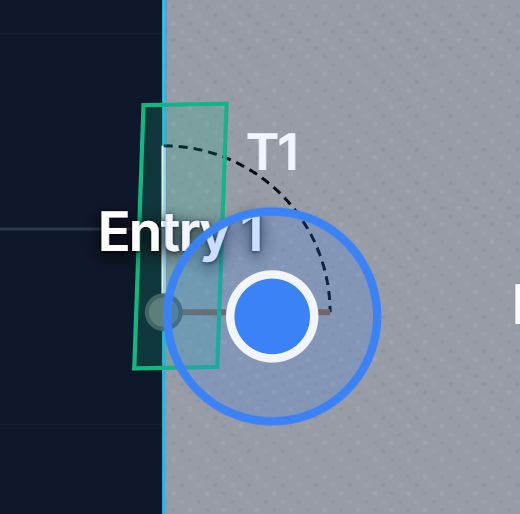
Setting Up Entry Zones
Step 1: Create an Entry Zone
- Open the Zone Editor
- Click Add Zone
- Draw a zone covering the doorway area
- In the zone properties, set Type to Entry
Step 2: Position the Zone Correctly
The entry zone should:
- Cover the full doorway width
- Extend slightly into the room
- Avoid overlapping normal occupancy zones where possible
- Be kept simple and rectangular where possible
Tip: Start with a rectangle that fully covers the doorway path before experimenting with more complex shapes.
Step 3: Save to Device
Click Save to Device to push the entry zone configuration to your EPL.
Configuration Options
Entry/Exit Enabled
Turns on the entry/exit heuristic and Assumed Presence logic.
Exit Threshold Pct
Adjusts how much tracked movement inside the entry zone is required before EPL treats a disappearance as a valid exit.
- Lower values make exit detection easier to trigger
- Higher values make EPL more likely to hold Assumed Presence instead of clearing
If you are seeing Assumed Presence clear too easily, try reducing this carefully. If you are seeing Assumed Presence hold when someone clearly left through the doorway, try increasing it.
Assume Present Timeout
Maximum time to hold Assumed Presence after a target is lost without a valid exit being detected.
Default: 30 minutes\nCurrent maximum: 12 hours
Setting guidance:
- Too short: occupancy may clear while someone is still in the room
- Too long: occupancy may stay on after someone left if the exit was missed
- Good starting point: 30-60 minutes for bedrooms, offices, and similar rooms
Entities Available Today
The current EPL firmware exposes:
| Entity | Description |
|---|---|
binary_sensor.[device]_assumed_present |
Whether EPL is currently holding occupancy using Assumed Presence |
sensor.[device]_assumed_present_remaining |
Remaining time, in seconds, before the Assumed Presence hold expires |
Entry/exit count entities are not currently exposed in EPL firmware.
Recommended Use Cases
Bedroom or Office
If someone enters, then becomes very still, Assumed Presence can help stop the room clearing immediately when tracking briefly drops.
Doorway Blind Spots
If tracking is occasionally lost near the room entrance, entry zones plus Assumed Presence can reduce false clears.
Limitations
Please be aware of the current limits:
- This is not a full room people-count system
- There are no dedicated entry or exit event entities today
- Polygon entry zones may be harder to tune than simple rectangular doorway zones
- The feature works best as a fallback hold for occupancy, not as a precise door-crossing counter
Troubleshooting
| Issue | Try this |
|---|---|
| Assumed Presence triggers too often | Check entry zone placement, avoid overlap, try a simpler rectangle, adjust Exit Threshold Pct |
| Assumed Presence never seems to help | Increase Assume Present Timeout and confirm Entry/Exit Enabled is on |
| Occupancy still clears while someone is present | Increase Assume Present Timeout and review doorway placement / blind spots |
| Feature feels inconsistent | Rebuild the entry zone as a simple rectangle and retest before tuning further |
Next Steps
- Zone Editor - Create and configure zones
- Troubleshooting - More help with zone issues